Thursday, April 26, 2012

SOA - Using FileIOInteractionSpec Class For Copying/Moving/Deleting Large File using File Adapter


(Reference https://kr.forums.oracle.com/forums/thread.jspa?threadID=904506)

If you need to copy/move/delete a big file, you have to use the follow configuration manually.

1. Create an inbound file adapter as you normally would. The schema is opaque, set the polling as required.
2. Create an outbound file adapter as you normally would, it doesn't really matter what xsd you use as you will modify the wsdl manually.
3. Create a XSD that will read your file. This would typically be the xsd you would use for the inbound adapter.
4. Create a  XSD that is the desired output. This would typically be the  XSD you would use for the outbound adapter.
5. Create the xslt that will map between the above 2  XSDs by selecting the BPEL project, right-click -> New -> General -> XSL Map in JDeveloper.
6. Edit the outbound file partner link wsdl, the the jca operations as the doc specifies.

<jca:binding  />
        <operation name="MoveWithXlate">
      <jca:operation
          InteractionSpec="oracle.tip.adapter.file.outbound.FileIoInteractionSpec"
          SourcePhysicalDirectory="foo1"
          SourceFileName="bar1"
          TargetPhysicalDirectory="C:\JDevOOW\jdev\FileIoOperationApps\MoveHugeFileWithXlate\out"
          TargetFileName="purchase_fixed.txt"
          SourceSchema="address-csv.xsd"  
          SourceSchemaRoot ="Root-Element"
          SourceType="native"
          TargetSchema="address-fixedLength.xsd"  
          TargetSchemaRoot ="Root-Element"
          TargetType="native"
          Xsl="addr1Toaddr2.xsl"
          Type="MOVE">
      </jca:operation>

7. Edit the outbound header in ftpAdapterOutboundHeader.wsdl
    <types>
        <schema attributeFormDefault="qualified" elementFormDefault="qualified" 
                targetNamespace="http://xmlns.oracle.com/pcbpel/adapter/file/"
                xmlns="http://www.w3.org/2001/XMLSchema" 
                xmlns:FILEAPP="http://xmlns.oracle.com/pcbpel/adapter/file/">
            <element name="OutboundFileHeaderType">
                <complexType>
                    <sequence>
                        <element name="fileName" type="string"/>
                        <element name="sourceDirectory" type="string"/>
                        <element name="sourceFileName" type="string"/>
                        <element name="targetDirectory" type="string"/>
                        <element name="targetFileName" type="string"/>                        
                    </sequence>
                </complexType>
            </element>  
        </schema>
    </types>   

8. The last trick is to have an assign between the inbound header and the outbound header partner link that copies the headers. You only need to copy the sourceDirectory and SourceGileName

    <assign name="Assign_Headers">
      <copy>
        <from variable="inboundHeader" part="inboundHeader"
              query="/ns2:InboundFileHeaderType/ns2:fileName"/>
        <to variable="outboundHeader" part="outboundHeader"
            query="/ns2:OutboundFileHeaderType/ns2:sourceFileName"/>
      </copy>
      <copy>
        <from variable="inboundHeader" part="inboundHeader"
              query="/ns2:InboundFileHeaderType/ns2:directory"/>
        <to variable="outboundHeader" part="outboundHeader"
            query="/ns2:OutboundFileHeaderType/ns2:sourceDirectory"/>
      </copy>
    </assign>

If you just want pass through, you don't need the native format set to opaque, with no XSLT

(Reference https://forums.oracle.com/forums/thread.jspa?threadID=2329322)
In the invocation, if you want to dynamically pass in the parameters.

<invoke name="InvokeFileMove"
    inputVariable="InvokeFileMove_MoveFile_InputVariable"
    partnerLink="MoveFileService" portType="ns1:MoveFile_ptt"
    operation="Move" bpelx:invokeAsDetail="no">
    <bpelx:inputProperty name="jca.file.SourceDirectory" variable="inputDirectory"/>
    <bpelx:inputProperty name="jca.file.SourceFileName" variable="inputFileName"/>
    <bpelx:inputProperty name="jca.file.TargetDirectory" variable="destinationDirectory"/>
    <bpelx:inputProperty name="jca.file.TargetFileName" variable="inputFileName"/>
</invoke>

Monday, April 23, 2012

BPEL - Moving a File from a Local Directory on the File System to Another Local Directory

The moving file needs manual configuration and not supported by the wizard.
http://docs.oracle.com/cd/E21764_01/integration.1111/e10231/adptr_file.htm#CHDGFAAB

BPEL - Controlling the order in which files get processed

For writing custom file sorting algorithms: Controlling the order in which files get processed
Come from https://blogs.oracle.com/adapters/

File Adapter can process files in parallel if there are multiple threads. In case you need a particular order in processed files, reference to the Oracle doc. http://docs.oracle.com/cd/E21764_01/integration.1111/e10231/adptr_file.htm

Thursday, April 19, 2012

SOA - The real endpoint used by BPEL processes.

In the OSB, we can see the real endpoint used by the proxy service from service bus console. In SOA suite, how could we know the endpoint of the service in runtime?

This is a pretty funny question and really tricky. So far, what I know we only can find the endpoint used by BPEL from the XML Schema definition in EM.

There are two scenarios.
First, you put a local WSDL file path in the location of reference of composite.

<reference name="GetDevicesSpringComponent" ui:wsdlLocation="oramds:/apps/wsdl/internal/IEquipmentService.wsdl">
    <interface.wsdl interface="http://equipmentService.services.mw.xcompany.com/#wsdl.interface(IEquipmentService)"/>
    <binding.ws port="http://equipmentService.services.mw.xcompany.com/#wsdl.endpoint(EquipmentSpringService/IEquipmentService_pt)"
                location="wsdl/EquipmentSpringService.WSDL"
                soapVersion="1.1">
      <property name="weblogic.wsee.wsat.transaction.flowOption"
                type="xs:string" many="false">WSDLDriven</property>
    </binding.ws>
  </reference>

Second, you put a physical address  in the location of reference of composite.

<reference name="GetDevicesSpringComponent" ui:wsdlLocation="oramds:/apps/wsdl/internal/IEquipmentService.wsdl">
    <interface.wsdl interface="http://equipmentService.services.mw.xcompany.com/#wsdl.interface(IEquipmentService)"/>
    <binding.ws port="http://equipmentService.services.mw.xcompany.com/#wsdl.endpoint(EquipmentSpringService/IEquipmentService_pt)"
                location="http://196.128.0.133:7001/soa-infra/services/default/SOA/EquipmentSpringService?WSDL"
                soapVersion="1.1">
      <property name="weblogic.wsee.wsat.transaction.flowOption"
                type="xs:string" many="false">WSDLDriven</property>
    </binding.ws>
  </reference>


For the first choice, the real webservice address is in your local WSDL file. From the EM, you only can see 'wsdl/EquipmentSpringService.WSDL', nothing else. If you want to know the real service invoked, you have to get the deployed ear file and check what the service endpoint is in the WSDL.

If you put a physical  address to the location and use the config plan to update it when you deploy, you will be able to see the real service address you are using from the composite XML definition.

Whatever you used. Actually, you just use two different ways for loading the WSDL. The real endpoint used in the service call is in the WSDL. If you put a WSDL file path in the location, you have to make sure the service endpoint is correct in the WSDL. When you put a physical address in the location, the WSDL will be directly loaded from that physical address, and definitely the service endpoint is correct in the loaded WSDL as the run-time WSDL always has the correct physical endpoint.

Where to find the XML definition?

Wednesday, April 18, 2012

SOA - How to define constant in SOA application?

In any project, we always have some constants needed to be defined. In Java, we can define them as constant by the follow keywords.
public static final


How could we define constant in SOA project to eliminate hard-coded text?
So far, in the SOA env, the only common place to put common value is the MDS. The DVM looks like the correct choice.

In the transformation, we can use DVM to get a constant value base on the name. Like in the follow condition, the DVM value will be used as an input parameter of the condition.
As the key is predefined, we don't need to change it when we change the DVM value. This will eliminate the hard-coded text in a transformation or assign.

All the data defined in DVM can be modified by SOA Composer after the application deployed. The composer URL is http://hostname:port/soa/composer or you can access composer from composer link in EM, which can be found in Applications Deployment.

The cross referencing feature enables you to dynamically integrate values between applications, whereas domain value maps enable you to specify values at design time and edit values at runtime. (Reference: 46 Working with Cross References of Developer's Guide for Oracle SOA Suite)

Tuesday, April 17, 2012

SOA - How to change the timeout of EM console in SOA 11g ?

http://soasol.blogspot.ca/
In the above blog, it mentioned we can change the timeout of em console. As the displayed content has problem and make you will be a little bit difficult to find the file. I just copy to here and make it display correctly.


1. In your SOA installation look for "emoms.properties" file
The path should be somewhere in your SOA_HOME under domains folder 

SOA_HOME/user_projects/domains/base_domain/servers/AdminServer/tmp/_WL_user/em/hsz5x1/META-INF/emoms.properties

2. Edit the file and add the line
oracle.sysman.eml.maxInactiveTime= < value >

where Value it's in minutes

4. Restart Admin & SOA server.

Monday, April 16, 2012

How to use workspace in JDeveloper

In the Eclipse, we can switch workspace from one to another. Also, we can directly start the Eclipse based on different workspace.

How about JDeveloper? 
Based on a Oracle Consultant help, we can start the JDeveloper with different workspace, but cannot switch worksapce. The follow parameter points out the workspace and you just need to put it in the starting command after the .exe, like the follow.

jdeveloper.exe -J-Dide.user.dir=C:\myWork


There is a folder .history, which contains all the backup of you modification. After long time, clean up it may save you hard disk space.

How to make the role selection appear everytime?
Change the setting in _oracle.ide.rolemgr.11.1.1.5.37.60.13/roleprefs.xml:
<value n="startupRoleUIEnabled" v="true"/>

Thursday, April 05, 2012

BPEL - webservice call local optimization

Just as the EJB call optimization in WebLogic, in Oracle SOA Suite, the local call also can be optimized and this feature is called local optimization. When it is TRUE(by default it's TRUE), the invocation will bypasse the whole SOAP stack, and makes a direct java call to optimize the invocation from one composite to another composite within the same Weblogic (WLS) server or cluster of WLS servers.


Set local optimization to TRUE
In the SOA composite (composite.xml), add the following property to the reference service which is invoked in the composite.


<reference>
   ......
    <property name="oracle.webservices.local.optimization">false</property>
</reference>


In the JDeveloper, open the composite and click the reference service.

In the Reference tab, find the Binding Properties and click the green cross to add a new property.
In the popup window Create Property, select oracle.webservices.local.optimization from the dropdown list. Then set the value to true.

NOTE: When local optimization is TRUE, OWSM policies are bypassed and hence aren't executed.

Thursday, March 29, 2012

SOA - How to clean the MDS

Sometime, you created some xsd files and deployed to MDS. Then you found you don't need them any more, How should I do now? The answer is we can use script to delete/remove them.

1. SOA WLST
run {SOA_HOME}\common\bin\wlst.cmd
1.1. Online
    wls:/offline> connect('weblogic', 'welcome1', 'localhost:7001')
    wls:/base_domain/serverConfig>deleteMetadata(application='soa-infra', server='AdminServer', docs='/apps/wsdl/**')

NOTE: soa-infra is the application defined by SOA deployment process
            AdminServer is the server name that applications are deployed
            /apps/wsdl/** is the folder/docs name
            deleteMetadata is Metadata Services (MDS) Custom WLST Commands

1.2. Offline
     wls:/offline> sca_removeSharedData('http://localhost:7001', 'wsdl', 'weblogic', 'welcome1')
               
NOTE: wsdl is a sub folder of the 'apps" in MDS repository
             sca_removeSharedData is SOA Suite Custom WLST Commands


2. Weblogic WLST
D:\beasoa\wlserver_10.3\common\bin\wlst.cmd . //Don't use this one


From the experience I got, the online mode works much better. Why I thought that as the offline mode could not delete the composite I deployed. Maybe I made some mistake, but the online mode really work.

Friday, March 23, 2012

BPEL - Unit test

Oracle SOA Suite 11g provides a testing framework to support
• Define tests, assertions, and emulations using JDeveloper
• Run these tests either from the EM console or on the command line using ANT
• Review the test results from the EM console or as a JUnit report


Three parts to a test case
1. Initiation defines the service and operation invoked along with the test data.
2. Emulation defines the message or fault returned from a reference or component invoked through a synchronous response or a callback without executing the component or referenced service.
3. Assertion compares the message or part of the message over an SCA wire against the expected data.


A test includes definitions of the initiation, emulations, and assertions. The test suite is a part of the composite project and is deployed along with the composite to the server and can be initiated from the EM console.

Creating the unit test

1. In the Application navigator of JDeveloper, expand the SOA Content folder and right-click on the test suites folder and select Create Test Suite.

2. Name the test suite and click on OK.

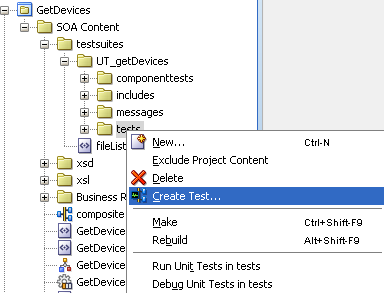
3. Right click on tests folder and select Create Test.

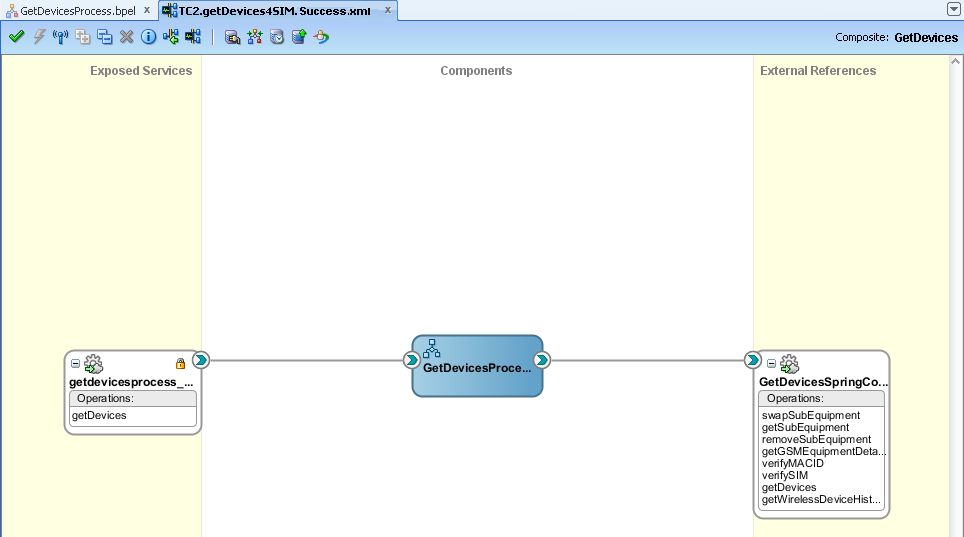
4. Name the test and click on OK. The unit test design view will display. It has slightly difference with the composite view. The swim lanes on the left and right are yellow.

    (NOTE: By selecting the Return to SOA composite diagram button at the top of the window, you can return to the normal composite editor.)

5. Create initiate message by right click on the binding component.
In the Initiate Messages window, you can click on Generate Sample to generate a sample request. After that, you can save the sample data as a xml file by Save As. Then, we can choose Load From File radio button to use the saved file.
Click on OK. After closing the dialog, you will see a blue arrow on the inbound component indicating that there is a message set for that service.

6. Double-click on the wire between BPEL process and the web service reference.
Select the Emulates tab and click on the plus sign.
In the Create Emulate window, you can generate a sample and save as a file. Then you can choose load from file.
Click on OK.
Click on OK again. After closing the dialog, notice that the wire has changed to a dashed line and there is an arrow indicating there is a message set for the return value of that service.

7. Double-click on the wire between BPEL process and the web service client interface.

  Add an assertion by selecting the green plus sign.
On the popup window, select Assert Output. Like the previous steps, you can generate a sample and save as a file and then select Load From File.
After everything is done, the view will look like the follow.

After you put correct testing data, you can deploy the application to SOA server and test it from EM.

8. Log into the EM and select the service. Select the Unit Tests tab on the right side and select the test case you want to run and click Execute button.
After execution, you can see the result on Test Run tab of Unit Tests.

In the creation of Unit Test, you need to be very careful to handle the naming spaces of XML. If the naming space is not correct, you may run into some stranger scenario.

In the Emulation, there are Emulate Output, Emulate Callback (used for asynchronized webservice) and Emulate Fault (used for a webservice with fault).
In the Assertion, there are Assert Input, Assert Output, Assert Callback and Assert Fault. You can choose different Assert Target by clicking on Browse button.
In the Select Assert Target window, you can select any element listed in the payload.

At last, if you have a web service without fault definition in the wsdl, you will not be able to use Assert Fault and it is not testable in the unit test. Currently, it is a constrain of SOA unit test framework.

Sometimes, maybe you runs a timeout when you run a test case. The reason maybe just the returned response is not what you want to assert. As there isn't matched response, the test runs timed out.

NOTE:
If you want to assert a request and response in XML fragment, you have to put the namespace properly, otherwise the assertions will be failed. You can find these error from the execution result and find out what the difference is between real result and expected result.

OSB - Design Time Considerations

(From http://www.art2dec.com/documentation/docs/fmw11g1114documentation/core.1111/e10108/osb.htm)


Design Time Considerations for Proxy Applications

Consider the following design configurations for proxy applications based on your OSB usage and use case scenarios:
  • Avoid creating many OSB context variables that are used just once within another XQuery
    Context variables created using an Assign action are converted to XmlBeans and then reverted to the native XQuery format for the next XQuery. Multiple "Assign" actions can be collapsed into a single Assign action using a FLWOR expression. Intermediate values can be created using "let" statements. Avoiding redundant context variable creation eliminates overheads associated with internal data format conversions. This benefit has to be balanced against visibility of the code and reuse of the variables.
  • Transforming contents of a context variable such as $body.
    Use a Replace action to complete the transformation in a single step. If the entire content of $body is to be replaced, leave the XPath field blank and select "Replace node contents". This is faster than pointing to the child node of $body (e.g. $body/Order) and selecting "Replace entire node". Leaving the XPath field blank eliminates an extra XQuery evaluation.
  • Use $body/*[1] to represent the contents of $body as an input to a Transformation (XQuery / XSLT) resource.
    OSB treats "$body/*[1]" as a special XPath that can be evaluated without invoking the XQuery engine. This is faster than specifying an absolute path pointing to the child of $body. A general XPath like "$body/Order" must be evaluated by the XQuery engine before the primary transformation resource is executed.
  • Enable Streaming for pure Content-Based Routing scenarios.
    Read-only scenarios such as Content-Based Routing can derive better performance from enabling streaming. OSB leverages the partial parsing capabilities of the XQuery engine when streaming is used in conjunction with indexed XPaths. Thus, the payload is parsed and processed only to the field referred to in the XPath. Other than partial parsing, an additional benefit for read-only scenarios is that streaming eliminates the overhead associated with parsing and serialization of XmlBeans.
    The gains from streaming can be negated if the payload is accessed a large number of times for reading multiple fields. If all fields read are located in a single subsection of the XML document, a hybrid approach provides the best performance. (See "Design Considerations for XQuery Tuning" for additional details.)
    The output of a transformation is stored in a compressed buffer format either in memory or on disk. Therefore, streaming should be avoided when running out of memory is not a concern.
  • Set the appropriate QOS level and transaction settings.
    Do not set XA or Exactly-Once unless the reliability level required is once and only once and its possible to use the setting (it is not possible if the client is a HTTP client). If OSB initiates a transaction, it is possible to replace XA with LLR to achieve the same level of reliability.
    OSB can invoke a back end HTTP service asynchronously if the QOS is "Best- Effort". Asynchronous invocation allows OSB to scale better with long running back-end services. It also allows Publish over HTTP to be truly fire-and-forget.
  • Disable or delete all log actions.
    Log actions add an I/O overhead. Logging also involves an XQuery evaluation which can be expensive. Writing to a single device (resource or directory) can also result in lock contentions.


Design Considerations for XQuery Tuning

OSB uses XQuery and XPath extensively for various actions like Assign, Replace, and Routing Table. The following XML structure ($body) is used to explain XQuery and XPath tuning concepts:
<soap-env:Body>
<Order>
<CtrlArea>
<CustName>Mary</CustName>
</CtrlArea>
<ItemList>
<Item name="ACE_Car" >20000 </Item>
<Item name=" Ext_Warranty" >1500</Item>
…. a large number of items
</ItemList>
<Summary>
<Total>70000</Total>
<Status>Shipped</Status>
<Shipping>My Shipping Firm </Shipping>
</Summary>
</Order>
</soap-env:Body>
  • Avoid the use of double front slashes ("//") in XPaths.
    $body//CustName while returning the same value as $body/Order/CtrlArea/CustName will perform a lot worse than the latter expression. "//" implies all occurrences of a node irrespective of the location in an XML tree. Thus, the entire depth and breadth of the XML tree has to be searched for the pattern specified after a "//". Use "//" only if the exact location of a node is not known at design time.
  • Index XPaths where applicable.
    An XPath can be indexed by simply adding "[1]" after each node of the path. XQuery is a declarative language and an XPath can return more than one node; it can return an array of nodes. $body/Order/CtrlArea/CustName implies returning all instances Order under $body and all instances of CtrlArea under Order. Therefore, the entire document has to be read in order to correctly process the above XPath. If you know that there is a single instance of Order under $body and a single instance of CtrlArea under Order, we could rewrite the above XPath as $body/Order[1]/CtrlArea[1]/CustName[1].
    The second XPath implies returning the first instances of the child nodes. Thus, only the top part of the document needs to be processed by the XQuery engine resulting in better performance. Indexing is key to processing only what is needed.
    Note:
    Indexing should not be used when the expected return value is an array of nodes. For example, $body/Order[1]/ItemList[1]/Item returns all "Item" nodes, but $body/Order[1]/ItemList[1]/Item[1] only returns the first item node. Another example is an XPath used to split a document in a "for" action.
  • Extract frequently used parts of a large XML document as intermediate variables within a FLWOR expression
    An intermediate variable can be used to store the common context for multiple values. Sample XPaths with common context:
    $body/Order[1]/Summary[1]/Total, $body/Order[1]/Summary[1]/Status,$body/Order[1]/Summary[1]/Shipping
    
    The above XPaths can be changed to use an intermediate variable:
    let $summary := $body/Order[1]/Summary[1]
    $summary/Total, $ summary/Status, $summary/Shipping
    
    Using intermediate variables consumes more memory but reduces redundant XPath processing.
  • Using a Hybrid Approach for read-only scenarios with Streaming
    The gains from streaming can be negated if the payload is accessed a large number of times for reading multiple fields. If all fields read are located in a single subsection of the XML document, a hybrid approach provides the best performance. The hybrid approach includes enabling streaming at the proxy level and Assigning the relevant subsection to a context variable, The individual fields can then be accessed from this context variable.
    The fields "Total" and "Status" can be retrieved using three Assign actions:
    Assign "$body/Order[1]/Summary[1]" to "foo"
    Assign "$foo/Total" to "total"
    Assign "$foo/Status" to "total"

Thursday, March 01, 2012

XML Schema - Structure Style

XML Schema  Design Pattern: Russian Doll, Salami Slice, Venetian Blind, and Garden of Eden

Russian Doll
The Russian Doll design approach has a schema structure mirroring the instance document structure, e.g., declare a Book element and within it declare a Title element followed by a Publisher element:

<xsd:element name="Book">
<xsd:complexType>
<xsd:sequence>
<xsd:element name="Title" type="xsd:string"/>
<xsd:element name="Publisher" type="xsd:string"/>
</xsd:sequence>
</xsd:complexType>
</element>

The instance document has all its components bundled together. Likewise, the schema is designed to bundle together all its element declarations.


Salami Slice
Salami Slice design disassembles the instance document into its individual components. In the schema, we define each component (as an element declaration), and then assemble them together:


<xsd:element name="Title" type="xsd:string"/>
<xsd:element name="Publisher" type="xsd:string"/>
<xsd:element name="Book">
<xsd:complexType>
<xsd:sequence>
<xsd:element ref="Title"/>
<xsd:element ref="Publisher"/>
</xsd:sequence>
</xsd:complexType>
</xsd:element>


Note how the schema declared each component individually (Title, and Publisher) and then assembled them together in the creation of the Book component


Venetian Blind

Similar to the Russian Doll approach in that they both use a single global element.  The Venetian Blind approach describes a modular approach by naming and defining all type definitions globally (as opposed to the Salami Slice approach which declares elements globally and types locally).  Each globally defined type describes an individual "slat" and can be reused by other components.  In addition, all the locally declared elements can be namespace qualified or namespace unqualified (the slats can be "opened" or "closed") depending on the elementFormDefault attribute setting at the top of the schema.  If the namespace is unqualified then the local elements in the instance document must not be qualified with the prefix of the namespace.


<?xml version="1.0" encoding="UTF-8"?>
<xs:schema targetNamespace="TargetNamespace" xmlns:TN="TargetNamespace" xmlns:xs="http://www.w3.org/2001/XMLSchema"
elementFormDefault="qualified" attributeFormDefault="unqualified">
   <xs:element name="Book" type="TN:BookType" maxOccurs="unbounded"/>
   <xs:complexType name="BookType">
       <xs:sequence>
           <xs:element name="Title" type="xsd:string"/>
           <xs:element name="Publisher"type="xsd:string"/>
           <xs:element name="PeopleInvolved" type="TN:PeopleInvolvedType" maxOccurs="unbounded"/>
       </xs:sequence>
   </xs:complexType>
   <xs:complexType name="PeopleInvolvedType">
       <xs:sequence>
           <xs:element name="Author"type="xsd:string"/>
       </xs:sequence>
   </xs:complexType>
</xs:schema>


Garden of Eden
The Garden of Eden design is a combination of Venetian Blind and Salami Slice. You define all the elements and types in the global namespace and refer to the elements as required.

<?xml version="1.0" encoding="UTF-8"?>
<xs:schema targetNamespace="TargetNamespace" xmlns:TN="TargetNamespace"
xmlns:xs="http://www.w3.org/2001/XMLSchema"
elementFormDefault="qualified" attributeFormDefault="unqualified">
   <xs:complexType name="BookType">
       <xs:sequence>
           <xs:element ref="Title"/>
           <xs:element ref="Publisher"/>
           <xs:element ref="PeopleInvolved" maxOccurs="unbounded"/>
       </xs:sequence>
   </xs:complexType>
   <xs:complexType name="PeopleInvolvedType">
       <xs:sequence>
           <xs:element ref="Author"/>
       </xs:sequence>
   </xs:complexType>
   <xsd:element name="PeopleInvolved type="TN:PeopleInvolvedType"/>
   <xs:element name="Title" type="xsd:string"/>
   <xs:element name="Publisher"type="xsd:string"/>
   <xs:element name="Author"type="xsd:string"/>
   <xs:element name="Book" type="TN:BookType" maxOccurs="unbounded"/>
</xs:schema>

Because it exposes all its elements and types globally, Garden of Eden, like Salami Slice, is completely reusable. However, because Garden of Eden exposes multiple elements as global ones, there are many potential root elements.


Tuesday, February 14, 2012

BPEL - XSL testing in SOA Suite

In SOA suite, we need to use XSL doing transformation. After the mapping in XSL, by right click on the white space in the middle of mapping, a popup menu will show up. Click the 'Test", a Test XSL Map window pops up. By this window, you can generate source XML and target XML to test the transformation.


If you confirm the default setting is correct, click the OK button to see the testing result. If there is any error, the transformation will be failed and the target XML will not be able to be generated.

Friday, February 10, 2012

Abstract WSDL vs. Concrete WSDL

Abstract WSDL(definitions )

An Abstract WSDL contains only Messages, PortTypes, and Operations
Abstract WSDL consists of the structure of the message that is like what operation, what is the input, what is the ouput and what is the fault message used by each operation to communicate with the web service, and their format.
An abstract WSDL document describes what the web service does, but not how it does it or how to contact it. An abstract WSDL document defines: the operations provided by the web service.


Concrete WSDL(implementation)
Concrete WSDL has all the things that the abstract wsdl has in addition it has transport(http,jms) details to tell how the web service communicates and where you can reach it.  A concrete WSDL document contains the abstract WSDL definitions, and also defines: the communication protocols and data encodings used by the web service, the port address that must be used to contact the web service. SOAP clients must retrieve the concrete WSDL file before sending a SOAP request to the service.


Abstract WSDL:- Used on server side,contains request,response and type of operation performed.
Concrete WSDL:- Used on client side,contains abstract wsdl and transport used.

Thursday, February 09, 2012

BPEL - How to handle an embeded XML message in a fault

In the development, the third part service returns a fault with a XML as a fault detail.
In order to get the real error message, I have to parse this XML to get the error code and error message.

In SOA Suite, there is a function named as parseXML.

parseXML
This function parses a string to a DOM element.
Signature: 
oratext:parseXML(contentString)
Arguments: 
contentString - The string that this function parses to a DOM element.
Property IDs: 
namespace-uri: http://schemas.oracle.com/xpath/extension
namespace-prefix: oratext

First, I need to get the XML message in the element <WL_FAULT_DETAIL>. The code is the follow. By this, I will be able to get a XML element <WL_FAULT_DETAIL>, which contains a XML string.
oraext:parseXML($RuntimeFault.detail)

The follow code will parse the XML string held by element <WL_FAULT_DETAIL> to a XML.
oraext:parseXML(oraext:parseXML($RuntimeFault.detail))

The above expression means:
1. Parse the detail to a XML and this XML contains another XML string like the follow.
<ser:ServiceFault xmlns:ser="http://rci.rogers.com/schemas/ServiceFault"><ser:Error id="1" lang="en"><ser:ErrorCode>SYSTEM FAILURE</ser:ErrorCode><ser:Description>[com.bea.nonxml.common.MFLException.create(MFLException.java:221) at com.bea.nonxml.common.MFLException.create(MFLException.java:344) at com.bea.nonxml.readers.NonXMLReaderVisitor.nextToken(NonXMLReaderVisitor.java:155) at com.bea.nonxml.readers.TokenNonXMLReader.nextToken(TokenNonXMLReader.java:44) at com.bea.wli.variables.util.ProcessXMLTokenReader.next(ProcessXMLTokenReader.java:56) at com.bea.wli.variables.util.TokenSourceSerializer.process(TokenSourceSerializer.java:284) at com.bea.wli.variables.ProcessXML.storeXML(ProcessXML.java:338) at com.bea.wli.variables.ProcessXML.storeTokenSource(ProcessXML.java:349) at com.bea.wli.variables.ProcessXML.&lt;init>(ProcessXML.java:124) at com.bea.wli.variables.XmlObjectVariableFactory.createProxy(XmlObjectVariableFactory.java:332) at com.bea.wli.variables.XmlObjectVariableFactory.createProxy(XmlObjectVariableFactory.java:298) at com.bea.wli.variables.MflObject.convertToXmlObject(MflObject.java:299) 
...
sun.reflect.NativeMethodAccessorImpl.invoke0(Native Method) a...]</ser:Description><ser:Value>RSSP</ser:Value></ser:Error></ser:ServiceFault>.

2. Pass the above text as a string to parseXML to get another XML and the root element will be <ser:ServiceFault>.

Then, it will be very esay to get the error code and error message by getChildElement function.
Error Code is
ora:getChildElement(ora:getChildElement(oraext:parseXML(oraext:parseXML($RuntimeFault.detail)),1),1)
Error Message is
ora:getChildElement(ora:getChildElement(oraext:parseXML(oraext:parseXML($RuntimeFault.detail)),1),2)

Tuesday, February 07, 2012

OSB - System Error Code - BEA-38000x

Server found but service not available, a BEA-380000 error code will be got with Not Found in description:

<con:fault   xmlns:con="http://www.bea.com/wli/sb/context">
<con:errorCode>BEA-380000</con:errorCode>
<con:reason>Not Found</con:reason>
<con:location>
<con:node>RouteNode1</con:node>
<con:path>response-pipeline</con:path>
</con:location>
</con:fault>

Server not running on same port, a BEA-380000 error code will be got with Socket Closed in description:

<con:fault   xmlns:con="http://www.bea.com/wli/sb/context">
<con:errorCode>BEA-380000</con:errorCode>
<con:reason>General runtime error: Socket Closed</con:reason>
<con:location>
<con:node>RouteNode1</con:node>
<con:path>request-pipeline</con:path>
</con:location>
</con:fault>

Timeout set on Business Service triggering (Target service still processing and Socket gets closed because of preconfigured timeout value on BS), a BEA-380000 error code will be got with SocketTimeOut exception stacktrace in Description.

<con:fault   xmlns:con="http://www.bea.com/wli/sb/context">
<con:errorCode>BEA-380000</con:errorCode>
<con:reason>
[WliSbTransports:381304]Exception in HttpOutboundMessageContext.RetrieveHttpResponseWork.run: java.net.SocketTimeoutException
java.net.SocketTimeoutException
 at weblogic.net.http.AsyncResponseHandler$MuxableSocketHTTPAsyncResponse$SocketTimeoutNotification.<clinit>(AsyncResponseHandler.java:551)
 at weblogic.net.http.AsyncResponseHandler$MuxableSocketHTTPAsyncResponse.handleTimeout(AsyncResponseHandler.java:396)
 at weblogic.net.http.AsyncResponseHandler$MuxableSocketHTTPAsyncResponse.timeout(AsyncResponseHandler.java:502)
 at weblogic.socket.SocketMuxer$TimerListenerImpl.timerExpired(SocketMuxer.java:1052)
 at weblogic.timers.internal.TimerImpl.run(TimerImpl.java:273)
 at weblogic.work.SelfTuningWorkManagerImpl$WorkAdapterImpl.run(SelfTuningWorkManagerImpl.java:528)
 at weblogic.work.ExecuteThread.execute(ExecuteThread.java:207)
 at weblogic.work.ExecuteThread.run(ExecuteThread.java:176)
</con:reason>
<con:location>
<con:node>RouteNode1</con:node>
<con:path>response-pipeline</con:path>
</con:location>
</con:fault>

Timeout while obtaining connection to remote server, a BEA-380000 error code will be got with Connect Timed Out in Description.

<con:fault   xmlns:con="http://www.bea.com/wli/sb/context">
<con:errorCode>BEA-380000</con:errorCode>
<con:reason>General runtime error: connect timed out</con:reason>
<con:location>
<con:node>RouteNode1</con:node>
<con:path>request-pipeline</con:path>
</con:location>
</con:fault>

OSB got some exception from the routing, a fault with error code BEA-380001 and message Internal Server Error will be created and save in fault.
<con:fault xmlns:con="http://www.bea.com/wli/sb/context">
  <con:errorCode>BEA-380001</con:errorCode>
  <con:reason>Internal Server Error</con:reason>
  <con:location>
    <con:node>Route to RoutingFaultHandlingBusinessService</con:node>
    <con:path>response-pipeline</con:path>
  </con:location>

</con:fault>

OSB cannot connect to service provider
<con:fault xmlns:con="http://www.bea.com/wli/sb/context">
  <con:errorCode>BEA-380002</con:errorCode>
  <con:reason>Tried all: '1' addresses, but could not connect over HTTP to server: '10.9.232.68', port: '8888'</con:reason>
  <con:location>
    <con:node>EntryPipelinePairNode4Entitlements</con:node>
    <con:pipeline>EntryPipelinePairNode4Entitlements_request</con:pipeline>
    <con:stage>RequestStage4Entitlements</con:stage>
    <con:path>request-pipeline</con:path>
  </con:location>

</con:fault>>


The follow message will be help on the problem investigation.
fn-bea:inlinedXML($body/soap-env:Fault/detail)

References
http://docs.tpu.ru/docs/oracle/en/fmw/11.1.1.6.0/apirefs.1111/e15034/TransportKernel.html
http://docs.tpu.ru/docs/oracle/en/fmw/11.1.1.6.0/apirefs.1111/e15034/toc.htm
http://docs.oracle.com/cd/E13171_01/alsb/docs25/consolehelp/errorcodes.html


Thursday, February 02, 2012

Subversion for Oracle WebLogic workshop.

Reference http://blogs.oracle.com/simonthorpe/entry/subversion_source_control_in_o

Now that the server is up and running, I want to enable my development environment to use it. I have installed on my workstation the 10g release of Workshop for Weblogic. You have two choices for this environment, Subclipse and Subversive. I decided on Subclipse for no other reason than it was listed first :)

Before we do anything with Workshop, I actually ran into a bug which limits the ability to install Subclipse via the "Software Updates" mechanism directly in the IDE. There is a workaround for this problem detailed below.

Comment out the com.* import lines in your %BEA_HOME%\wlportal_10.3\eclipse\features\com.bea.wlp_10.3.0\feature.xml, like this:


<requires>
<import plugin="org.eclipse.core.runtime" version="3.3" match="compatible"/>
<import plugin="org.eclipse.ui" version="3.3" match="compatible"/>
<!--
<import feature="com.m7.nitrox" version="1.0.20" match="compatible"/>
<import feature="com.bea.workshop.cmdline.feature" version="1.0.30" match="compatible"/>
<import feature="com.bea.workshop.common.feature" version="1.1.40" match="compatible"/>
<import feature="com.bea.workshop.upgrade81.feature" version="1.0.30" match="compatible"/>
<import feature="com.bea.workshop.web.feature" version="1.0.20" match="compatible"/>
<import feature="com.bea.workshop.wls.feature" version="1.1.30" match="compatible"/>
<import feature="com.bea.workshop.xmlbeans.feature" version="1.0.30" match="compatible"/>
-->
</requires>


Then restart Workshop
Once you've done this follow these instructions to download and install the subversion client.
Start Workshop for WebLogic and go to "Help > Software Updates > Find and Install..." then select Search for new features to install. Click on New Remote Site and enter;
  • Name = subclipse 1.6
  • URL = http://subclipse.tigris.org/update_1.6.x
Once added, ensure that this site is the only one checked in the sites to include in the search and hit Finish. You will be presented with a tree to choose the components, I selected the following;
workshop_subclipse01.gif

Agree to the licenses

workshop_subclipse02.gif

Accept the optional component;

workshop_subclipse03.gif

Finally hit finish to install everything. Note these are not signed packages so you'll need to agree also to install the unsigned components. At the end you'll be asked to restart Workshop.

workshop_subclipse04.gif

Checkout test project from subversion in Workshop for WebLogic


Ok, nearly there. Now its time to checkout that test repository I created during the server setup.
In Workshop go to "File > New > Other" and in the resulting dialog find the SVN section and choose Checkout Projects from SVN.


workshop_subclipse05.gif


Select Create a new repository location. It now asks for the URL to the server, remember this is in the format SVN://servername/respository my example is shown below. The client will attempt to connect after which you can select the URL to get to the Check Out As dialog.


workshop_subclipse06.gif


The check out dialog now asks what you want to do with the project. If you want you can create a new project using the Workshop's wizard. However I just wanted to add a vanilla project so selected Check out as a project in the workspace, like below and hit Finish. It also warns me that i'm checking out the entire root which is fine for this test.


workshop_subclipse07.gif


You will now have an empty project folder in Workshop. You can take a look at all the version control options now by right clicking on the project and selecting the Team menu. Here you have access to all the branching, merging etc features.

Thursday, January 26, 2012

OSB - How to change the logging level

Problem:
I created a proxy service and added a Log action to log out the message body, but I didn't see the log on WebLogic console.

Solution:
The problem is related with log level as the default level is higher than info level. Change the log level will solve  it.

1. Enter the WSL admin console
2. Click on Environment->Servers
3. Click on Admin Server (or the appropriate server name of yours)
4. Select Logging tab
5. Click Advanced
6. Set Severity Level of Standard Out to Debug.
7. Click Save

After that, maybe a restart is needed.

OSB - XQuery expression validation failed.

Problem:
OSB fault cannot be used directly in exception hanlder and got an error message as "Xquery expression validation failed: The variable "fault" cannot be used here. "

Solution:
In the exception handler, first use "Assign" to assign the $fault to a variable, e.g. $myFault, then you can use the variable as what you need.

Friday, January 20, 2012

BPEL - Handle variables in a 'Assign'

Recently, I worked on a project and used array to save all of exceptions catched in a loop. I set the value to the array used a variable as index, but it doesn't work. I tested it with a number directly, it works well. By the colleague help, I eventually fixed this issue and make the array work with a variable as index.

The tricky thing is the table on the edit assign supports right click and can pop up a menu. The menu is the magic.


From the menu, select the insertMissingToData, then the array setting will work.
The change to the element is
<copy bpelx:insertMissingToData="yes">

This is not the only tricky thing as it is not only apply to the variable in an array, for any variable is same if the XML document is not initialized by some operation already. You have to set insertMissingToData="yes".

Another tricky thing is the generated XML. The order of XML elements is related with the order of assigning.