Showing posts with label MDS. Show all posts
Showing posts with label MDS. Show all posts
Thursday, April 25, 2013
Token Configurations in Oracle SOA Suite PS6
Eventually, we find a way to deploy our application easier and can modify the endpoint of service instead of redeploy the application with deployment plan.
References:
http://docs.oracle.com/cd/E28280_01/dev.1111/e10224/sca_bindingcomps.htm#CIHFJFJC
http://biemond.blogspot.ca/search?updated-min=2013-01-01T00:00:00%2B01:00&updated-max=2014-01-01T00:00:00%2B01:00&max-results=3

Thursday, September 01, 2011
Using Shared Object in Soa Suite 11g with MDS
(From http://biemond.blogspot.com/search/label/MDS)
Inspired by Eric Elzinga , who was wondering how MDS can work in Soa Suite 11g , I made some screenshots how you can use a XSD from a central MDS repository in your composite application. Clemens already blogged about re-using common metadata and he made a great ant utility to import or delete MDS files. For 11G R1 PS1 or higher use this instead of the Clemens utility
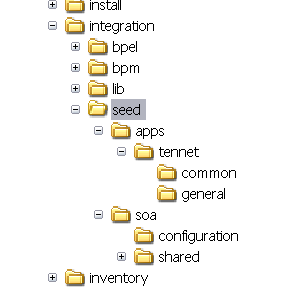
First I make a local MDS repository. If you install the Soa plugin you already have a seed folder in the integration folder. Under this folder create an new folder called apps. ( this have has to be apps else you will get a permission denied error ) . Under this apps folder we can create our own definitions.
To use my local SOA-MDS repository I create a new MDS File Connection

I want to re-use these common objects in every Soa project so I choose for the resource palette option

select the seed folder in the integration folder

Here we can see our common application objects.

Open the application resources window and open the adf-config.xml
 Here we define a new metadata namespace with apps as path. And use the integration folder as metadata-path value.

We are ready to use these common objects in a mediator.. Here I will use a schema from the local MDS as input parameter for the mediator.
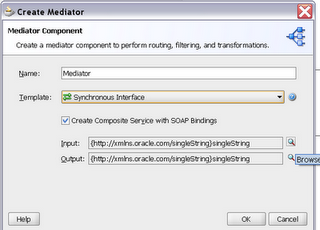
Import a new schema

Select the resource browser and here we can select our schema from the local MDS

I uncheck the Copy to project option, because this XSD already exists in the MDS

Our Project is ready but If we want to deploy this Soa project, we will receive a error, it can't find the schema. So we need to export the local MDS files to the SOA Suite database MDS.
To do this we have 2 options , the first option is to create a MAR deployment ( Application properties ) or do this with Ant.
I stripped the Clemens ant project so this ant build file has only two tasks , add and delete. It uses the adf-config.xml ( config folder) for the location of the target MDS and I use the local MDS as source.

Here is the target adf-config.xml which is located in the config folder

Change the build.properties so it matches your environment
 This will import your local MDS object to the remote MDS. After this you can deploy your Soa Suite project.
Here you can download my ant project. Thanks to Clemens.
Inspired by Eric Elzinga , who was wondering how MDS can work in Soa Suite 11g , I made some screenshots how you can use a XSD from a central MDS repository in your composite application. Clemens already blogged about re-using common metadata and he made a great ant utility to import or delete MDS files. For 11G R1 PS1 or higher use this instead of the Clemens utility
First I make a local MDS repository. If you install the Soa plugin you already have a seed folder in the integration folder. Under this folder create an new folder called apps. ( this have has to be apps else you will get a permission denied error ) . Under this apps folder we can create our own definitions.
To use my local SOA-MDS repository I create a new MDS File Connection
I want to re-use these common objects in every Soa project so I choose for the resource palette option
select the seed folder in the integration folder
Here we can see our common application objects.
Open the application resources window and open the adf-config.xml
We are ready to use these common objects in a mediator.. Here I will use a schema from the local MDS as input parameter for the mediator.
Import a new schema
Select the resource browser and here we can select our schema from the local MDS
I uncheck the Copy to project option, because this XSD already exists in the MDS
Our Project is ready but If we want to deploy this Soa project, we will receive a error, it can't find the schema. So we need to export the local MDS files to the SOA Suite database MDS.
To do this we have 2 options , the first option is to create a MAR deployment ( Application properties ) or do this with Ant.
I stripped the Clemens ant project so this ant build file has only two tasks , add and delete. It uses the adf-config.xml ( config folder) for the location of the target MDS and I use the local MDS as source.
Here is the target adf-config.xml which is located in the config folder
Change the build.properties so it matches your environment
Here you can download my ant project. Thanks to Clemens.
Wednesday, August 31, 2011
Re-using common metadata (wsdl / xsd / edl) in SOA Suite 11g
(From http://blogs.oracle.com/soabpm/entry/reusing_common_metadata_wsdl_x)
As promised here is the first of a set of tips for the brand new SOA Suite 11g.
Managing dependencies between services at development as well as runtime is a challenging task when people implement Service-Providers and -Consumers.
There are a few approaches that worked well in the past and will continue to work well on 11g - yet there are a few notable differences between the releases that should make dependency mgmt way easier in 11g.
Preface:
In the 10.1.3. BPEL world we used to have one global cache for wsdls and schemas. Hence having twice the same (with possible differences) would get you one that overwrites the other.
In 11g SOA Suite, each composite (and revision) has its own store for artifacts, so they don't clash.
Four approaches are in use today (in 10.1.3.x)
a. not preferred at all) Don't bother much and have copies of concrete wsdls in your consuming artifacts. Well that is not sharing, and if the provider changes you need to redeploy the consumer
b. and still not a good approach) Reference the deployed concrete wsdl of a Service Provider. Problem here: Provider not deployed, consumer can't compile or be deployed
c. and the first step to reuse) Introduce a common directory of abstract wsdls and copy them around from project to project. Use wsdlRuntimeLocation on the partnerlink to point to the concrete implementation. Eventually change that during deployment time with the deployment plan.
d. and the next step to reuse) Store abstract wsdls on a centrally accessible endpoint (that might be a war or just an http server) employ the same approach from (c). Problem here - we cache them, you need to refresh the wsdl cache on the BPEL Server.
In SOA Suite 11g we introduced a set of changes that helps you sharing, notable the biggest being the introduction of MDS (MetaData Service) that backs your application (and hence your composites) at designtime as well as runtime.
Think of MDS like a version management system that is used all accross the platform, that you can use to share common artifacts at design and runtime.
So where is your mds located, and how does an application know which one to take?
The configuration sits in $application_home/.adf/META-INF/adf-config.xml and by default points to your local - JDeveloper file system based mds.
Let's examine mine used for fusion order demo
 The first important thing to note is the store type. By default this is file based - described with oracle.mds.persistence.stores.file.FileMetadataStore. Now the base path to your mds is described with the property called metadata-path. From here on you can have multiple partitions, but usually one per application. In our case, the partition is called seed. From here, namespaces are used that map to directory structures. These are defined in the
 section, and by default you get the one that points to internally shared artifacts for your SOA projects, called /soa/shared.
How is mds used in your SOA project then? For example if you create a business rule (yup and that is one of the new features on the JDeveloper UI side) we create you a bunch of artifacts, but the common ones are imported from mds.
An example is
<xsd:import namespace=http://xmlns.oracle.com/bpel
schemaLocation="oramds:/soa/shared/rules/BpelProcess.xsd"/>
Note the namespace being used. If you follow the directory structure based on your adf-config.xml you find this schema. In my case the BpelProcess.xsd is located in C:\JDeveloper\JDev_11.1.1.0\jdeveloper\integration\seed\soa\shared\rules.
A few thoughts here to consider (and succeed):
a) this default namespace is reserved for soa suite infrastructure, and something you should NOT use
b) if you add stuff to the local mds and use it through oramds:/, you need to transfer those artifacts to the server MDS, so the deployment does work.
c) the namespace you should use, that is known to the soa server as well is called apps. To use it - add another namespace to, as I did above in my adf config that says, and create an apps directory under the seed folder. On the server this directory is already there.
Using the shared artifacts:
If you expand the resource browser, there is a section called soa mds connections. Create one for your local environment by picking file as type and specify $ORACLE_HOME\jdeveloper\integration\seed. Whatever you pick now in the resource browser when you work on your composite will be automatically based on the right urls.
Last but not least - create a mar deployment profile on the application level with those shared artifacts, and deploy them to the server.
As promised here is the first of a set of tips for the brand new SOA Suite 11g.
Managing dependencies between services at development as well as runtime is a challenging task when people implement Service-Providers and -Consumers.
There are a few approaches that worked well in the past and will continue to work well on 11g - yet there are a few notable differences between the releases that should make dependency mgmt way easier in 11g.
Preface:
In the 10.1.3. BPEL world we used to have one global cache for wsdls and schemas. Hence having twice the same (with possible differences) would get you one that overwrites the other.
In 11g SOA Suite, each composite (and revision) has its own store for artifacts, so they don't clash.
Four approaches are in use today (in 10.1.3.x)
a. not preferred at all) Don't bother much and have copies of concrete wsdls in your consuming artifacts. Well that is not sharing, and if the provider changes you need to redeploy the consumer
b. and still not a good approach) Reference the deployed concrete wsdl of a Service Provider. Problem here: Provider not deployed, consumer can't compile or be deployed
c. and the first step to reuse) Introduce a common directory of abstract wsdls and copy them around from project to project. Use wsdlRuntimeLocation on the partnerlink to point to the concrete implementation. Eventually change that during deployment time with the deployment plan.
d. and the next step to reuse) Store abstract wsdls on a centrally accessible endpoint (that might be a war or just an http server) employ the same approach from (c). Problem here - we cache them, you need to refresh the wsdl cache on the BPEL Server.
In SOA Suite 11g we introduced a set of changes that helps you sharing, notable the biggest being the introduction of MDS (MetaData Service) that backs your application (and hence your composites) at designtime as well as runtime.
Think of MDS like a version management system that is used all accross the platform, that you can use to share common artifacts at design and runtime.
So where is your mds located, and how does an application know which one to take?
The configuration sits in $application_home/.adf/META-INF/adf-config.xml and by default points to your local - JDeveloper file system based mds.
Let's examine mine used for fusion order demo

How is mds used in your SOA project then? For example if you create a business rule (yup and that is one of the new features on the JDeveloper UI side) we create you a bunch of artifacts, but the common ones are imported from mds.
An example is
<xsd:import namespace=http://xmlns.oracle.com/bpel
schemaLocation="oramds:/soa/shared/rules/BpelProcess.xsd"/>
Note the namespace being used. If you follow the directory structure based on your adf-config.xml you find this schema. In my case the BpelProcess.xsd is located in C:\JDeveloper\JDev_11.1.1.0\jdeveloper\integration\seed\soa\shared\rules.
A few thoughts here to consider (and succeed):
a) this default namespace is reserved for soa suite infrastructure, and something you should NOT use
b) if you add stuff to the local mds and use it through oramds:/, you need to transfer those artifacts to the server MDS, so the deployment does work.
c) the namespace you should use, that is known to the soa server as well is called apps. To use it - add another namespace to, as I did above in my adf config that says
Using the shared artifacts:
If you expand the resource browser, there is a section called soa mds connections. Create one for your local environment by picking file as type and specify $ORACLE_HOME\jdeveloper\integration\seed. Whatever you pick now in the resource browser when you work on your composite will be automatically based on the right urls.
Last but not least - create a mar deployment profile on the application level with those shared artifacts, and deploy them to the server.
Wednesday, August 24, 2011
Oracle SOA 11g MDS
(From http://markchensblog.blogspot.com/2011/08/oracle-soa-mds.html)
A metadata repository is the centralized store for the metadata used for the applications in Oracle SOA. It is very useful since most organizations and companies have their own common data models defined as XML schema and WSDL files. These files are organized in some hierarchies and there are dependencies among them. Obviously it is not wise to have local copies of these files for each SOA application. The metadata repository: MDS – Metadata Store in Oracle SOA provides to share these common metadata among the various SOA applications.



A metadata repository is the centralized store for the metadata used for the applications in Oracle SOA. It is very useful since most organizations and companies have their own common data models defined as XML schema and WSDL files. These files are organized in some hierarchies and there are dependencies among them. Obviously it is not wise to have local copies of these files for each SOA application. The metadata repository: MDS – Metadata Store in Oracle SOA provides to share these common metadata among the various SOA applications.
In Oracle SOA there are two types of MDS: file-based and database-based. File-based MDS uses the file system to store all these metadata and database-based uses the database. File-based MDS is only used for the development purpose. If the application is deployed on sever the database-based MDS must be used.
File-based MDS
Normally when you do the SOA application development using JDeveloper you usually uses file-based MDS. It is much easier to use file-based MDS for the development purpose. For each application there is one adf-config.xml located in YourAppFolder/.adf/META-INF folder.

In the adf-config.xml the element defines the metadata-namespace and metadata-store-usage from which we know where the shared artefacts. In this example the wsdl and schema files are located in the folder:
D:\Oracle\Middleware\jdeveloper\integration\seed\apps\SOInterfaces-2.3.9.8
where D:\Oracle\Middleware\jdeveloper\integration is the metadata-path and seed is partition-name and apps\SOInterfaces-2.3.9.8 is the namespace-path.

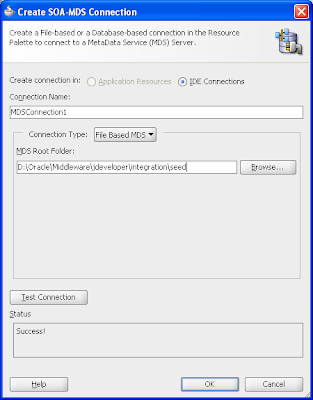
After the artefacts are put into the right file folder specified in adf-config.xml you can create one MDS connection in JDeveloper to view all the wsdl and schema files in the MDS.
From JDeveloper right click on Applic ation Resources->Connections and then select SOA-MDS from New Connection menu item. Then in the popup window: Create SOA-MDS Connection type in the Connection Name and choose File Based MDS as the Connection Type and type in the MDS Root Folder as: D:\Oracle\Middleware\jdeveloper\integration\seed. You can test the connection by clicking on Test Connection button. If the test is su ccessful click on OK button.
After the MDS connection is created you can see it from IDE Connections in JDeveloper.


Once the MDS is created you use it in your development. For example in your BPEL application you can choose one WSDL from MDS as the service interface of the BPEL process.
In the application one artefact such as wsdl or xsd is referenced it will be referred using oramds protocol. The below is one example from a wrapper wsdl.
location="oramds:/apps/SOInterfaces-2.3.9.8/BSC/OrderAndActivation/Activation/ServiceProvisioning-v1.wsdl"
Wednesday, December 08, 2010
Oracle Fusion Metadata Repository
What does Oracle Fusion Metadata Reposity hold fro you?
Metadata Repository - contains metadata for Fusion Middleware Components (SOA, Webcenter, Identity Management). Repository could be Database-based or File-based, most components (Webcenter, SOA, OID…) require Database-based Repository.
How to create Database-based repository ?
RCU - Repository Creation Utility is the tool to create schema and load repository in existing database for Fusion Middleware components.
RCU creates default schema and load repository in default tablespaces. RCU provides flexibility to change schema or tablespace name. (Only exception to this is Oracle Internet Directory (OID) schema). You could load multiple repository (like Portal, webcenter, SOAINFRA) in single database. This interesting feature is you could load different version of same repository (like dev_soainfra, test_soainfra for DEV & Test instance.) in same database for multiple Fusion Middleware Instances.
How to run RCU?
Metadata Repository - contains metadata for Fusion Middleware Components (SOA, Webcenter, Identity Management). Repository could be Database-based or File-based, most components (Webcenter, SOA, OID…) require Database-based Repository.
How to create Database-based repository ?
RCU - Repository Creation Utility is the tool to create schema and load repository in existing database for Fusion Middleware components.
RCU creates default schema and load repository in default tablespaces. RCU provides flexibility to change schema or tablespace name. (Only exception to this is Oracle Internet Directory (OID) schema). You could load multiple repository (like Portal, webcenter, SOAINFRA) in single database. This interesting feature is you could load different version of same repository (like dev_soainfra, test_soainfra for DEV & Test instance.) in same database for multiple Fusion Middleware Instances.
How to run RCU?
RCU can be run in two modes - GUI (Graphical User Interface) & CLI (Command LineInterface). For Fusion Middleware 11g R1 (11.1.1.X) or higher , RCU can only load schema in Oracle Database (version 10.2.0.4 and higher or 11.1.0.7 and higher). It can be run locally (same machine with Database) or Remotely(Database is on remote machine).
RCU (Repository Creation Utility) can be run from $RCU_SOFTWARE/bin/ rcu (for Unix) or rcu.bat (for Windows) ; This will start RCU in GUI mode. For CLI mode use “rcu [-silent | -interactive] {} ”.
RCU (Repository Creation Utility) can be run from $RCU_SOFTWARE/bin/ rcu (for Unix) or rcu.bat (for Windows) ; This will start RCU in GUI mode. For CLI mode use “rcu [-silent | -interactive] {
RCU log is written to the RCU_SOFTWARE_DIR/ rcu/ log/ logdir./rcu.log .
There are various types of Repository:
- Metadata Services (MDS)
- Audit Services (IAU)
- Oracle Internet Directory (OID)
- Single Sign-On (SSO)
- SOA Infrastructure (SOAINFRA)
- Business Activity Monitoring (BAM)
- User Messaging (ORASDPM)
- Oracle WebCenter (WEBCENTER)
- WebCenter Portlets (PORTLETS)
- Oracle Content Server (OCSERVER)
- Portal (PORTAL)
- Discoverer (DISCOVERER)
- Oracle Identity Federation (OIF)
- Discussions (DISCUSSIONS)
- Wiki and Blog (WIKI)
Subscribe to:
Posts (Atom)