From http://blog.xebia.com/2009/04/06/why-did-hibernate-update-my-database/
Hibernate is a sophisticated ORM framework, that will manage the state of your persistent data for you. Handing over the important but difficult task of managing persistent state of your application to a framework has numerous advantages, but one of the disadvantages is that you sort of lose control over what happens where and when. One example of this is the dirty checking feature that Hibernate provides. By doing dirty checking, Hibernate determines what data needs to be updated in your database. In many cases, this feature is quite useful and will work without any issues, but sometimes you might find that Hibernate decides to update something that you did not expect. Finding out why his happened can be a rather difficult task.
I was asked to look into some issue with a StaleObjectState exception the other day. StaleObjectState exceptions are used by hibernate to signal an optimistic locking conflict: While some user (or process) tries to save a data item, the same data item has already been changed in the underlying database since it was last read. Now the problem was that the process that was throwing the exception was the only process that was supposed to change that data. From a functional point of view there could not have been any other user or process that changed the data in the meantime. So what was going on?
Digging around in the log for some time, we found that the data was updated by some other process that was supposed to only read that data. Somehow Hibernate decided that the data read by that process had become dirty and should be saved. So now he had to find out why Hibernate thought that data was dirty.
Hibernate can perform dirty checking in several places in an application:
1. When a transaction is being committed or a session is being flushed, obviously, because at that time changes made in the transaction or session should be persisted to the database
2. When a query is being executed. To prevent missing changes that still reside in memory, Hibernate will flush data that might be queried to the database just before executing the query. It tries to be picky about this and not flush everything all the time, but only the data that might be queried.
It is quite difficult to check all these places to find out where the data is being find dirty, especially when the process executes several queries.
To find out why Hibernate deems the data to be dirty, we have to dig into the Hibernate internals and start debugging the framework code. The Hibernate architecture is quite complex. There are a number of classes that are involved in dirty checking and updating entities:
The DefaultFlushEntityEventListener determines what fields are dirty. The internals of this class work on the list of properties of an entity and two lists of values: the values as loaded from the database and the values as currently known to the session. It delegates finding out the ''dirty-ness' of a field to the registered Interceptor and to the types of the properties.
The EntityUpdateAction is responsible for doing the update itself. An object of this type will be added to a ActionQueue to be executed when a session is flushed.
These classes show some of the patterns used in the internals of Hibernate: eventing and action queuing. These patterns make the architecture of the framework very clear, but they also make following what is going on sometimes very hard...
As previously explained, flushing happens quite often and setting a breakpoint in the DefaultFlushEntityEventListener is not usually a good idea, because it will get hit very often. An EntityUpdateAction, however, will only get created when an update will be issued to the underlying database. So to find out what the problem was, I set a breakpoint in the constructor and backtracked from there. It turned out Hibernate could not determine the dirty state of the object and therefor decided to update the entity just to be save.
As mentioned eralier, Hibernate uses the "loaded state" to determine whether an object is dirty. This is the state of the object (the values of its properties) when loaded form the database. Hibernate stores this information in its persistence context. When dirty checking, Hibernate compares these values to the current values. When the "loaded state" is not available, Hibernate effectively cannot do dirty checking and deems the object dirty. The only scenario, however, in which the loaded state is unavailable is when the object has been re-attached to the session and thus not loaded from the database. The process I was looking into, however did not work with detached data.
There is one other scenario in which Hibernate will lose the "loaded state" of the data: When the session is being cleared. This operation will discard all state in the persistence context completely. It is quite a dangerous operation to use in your application code and it should only be invoked if you are very sure of what you're doing. In our situation, the session was being flushed and cleared at some point, leading to the unwanted updates and eventually the StaleObjectStateExceptions. An unwanted situation indeed. After removing the clear, the updates where gone and the bug was fixed.
Using Hibernate can save a developer a lot of time, when things are running smoothly. When a problem is encountered, a lot of specialized Hibernate knowledge and a considerable amount of time is often needed to diagnose and solve it.
Sunday, October 18, 2009

Friday, October 16, 2009
JPA and Hibernate Tutorial
A tutorial website of hibernate.
http://www.hibernate-training-guide.com/index.html
Hibernate 3 Annotations Tutorial
http://loianegroner.com/2010/06/hibernate-3-annotations-tutorial/
Two slides from Sun.
http://www.slideshare.net/caroljmcdonald/td09jpabestpractices2
http://developers.sun.com/learning/javaoneonline/2007/pdf/TS-4902.pdf?
http://java.sun.com/javaee/5/docs/tutorial/doc/bnbqw.html
Basic Java Persistence API Best Practices
http://www.oracle.com/technology/pub/articles/marx-jpa.html
An IBM Book
http://books.google.ca/books?id=ko5KTfIHjasC&printsec=frontcover&source=gbs_v2_summary_r&cad=0#v=onepage&q=&f=false
http://www.hibernate-training-guide.com/index.html
Hibernate 3 Annotations Tutorial
http://loianegroner.com/2010/06/hibernate-3-annotations-tutorial/
Two slides from Sun.
http://www.slideshare.net/caroljmcdonald/td09jpabestpractices2
http://developers.sun.com/learning/javaoneonline/2007/pdf/TS-4902.pdf?
http://java.sun.com/javaee/5/docs/tutorial/doc/bnbqw.html
Basic Java Persistence API Best Practices
http://www.oracle.com/technology/pub/articles/marx-jpa.html
An IBM Book
http://books.google.ca/books?id=ko5KTfIHjasC&printsec=frontcover&source=gbs_v2_summary_r&cad=0#v=onepage&q=&f=false
Generic Repository - Generic DB access?
Generic Repository (grepo) is an open source (ASLv2) framework for Java which allows you to access (database) repositories in a generic and consistent manner.
The main features of the framework are:
* generic support for Hibernate based DAOs
* generic support for Jpa based DAOs
* generic support for executing database stored-procedures and functions
* highly customizable
The "Generic Query" component allows to access databases using SQL queries. Currently the following ORM (Object Relational Mapping) tools/APIs are supported:
* Native Hibernate API
* Java Persistence API
The "Generic Procedure" component allows to access databases using PLSQL (that is calling stored procedures and/or functions) without requiring custom implementations - gprocedure is build on top of the Spring (JDBC) framework.
History
Daniel Guggi
The Generic Repository Framework (grepo) has its origins back in 2007. I started development after reading Per Mellqvist's article "Don't repeat the DAO". My employer BearingPoint INFONOVA GmbH develops and maintains various business applications for its customers (mainly telecom providers). The software is developed/extended by various development (scrum) teams. Even though we have a professional development environment (using professional/good tools and frameworks etc...) and development guidelines (detailed coding conventions etc...) it turned out that the data access layers in our software products got quite fragmented, inconsistent and bloated - mainly because of big development teams and large software products, the typicall daily project-stress and the always reoccoring (similar) boilerplate code for database access logic. So we started developing a framework which in turn was tuned and improved in order to achieve the following main goals for our software products:
* Ensure coding conventions and guidelines.
* Avoid boilerplate code for database access logic.
* Improve development time and code quality.
Finally we came up with a framework based on Spring and Hibernate. The framework is integrated in our software products for quite a while right now and is used for basically (at least about 90%) all new database related access objects. We are quite happy with the result and thus we decided to make it open source - and so the Generic Repository project was born.
The main features of the framework are:
* generic support for Hibernate based DAOs
* generic support for Jpa based DAOs
* generic support for executing database stored-procedures and functions
* highly customizable
The "Generic Query" component allows to access databases using SQL queries. Currently the following ORM (Object Relational Mapping) tools/APIs are supported:
* Native Hibernate API
* Java Persistence API
The "Generic Procedure" component allows to access databases using PLSQL (that is calling stored procedures and/or functions) without requiring custom implementations - gprocedure is build on top of the Spring (JDBC) framework.
History
Daniel Guggi
The Generic Repository Framework (grepo) has its origins back in 2007. I started development after reading Per Mellqvist's article "Don't repeat the DAO". My employer BearingPoint INFONOVA GmbH develops and maintains various business applications for its customers (mainly telecom providers). The software is developed/extended by various development (scrum) teams. Even though we have a professional development environment (using professional/good tools and frameworks etc...) and development guidelines (detailed coding conventions etc...) it turned out that the data access layers in our software products got quite fragmented, inconsistent and bloated - mainly because of big development teams and large software products, the typicall daily project-stress and the always reoccoring (similar) boilerplate code for database access logic. So we started developing a framework which in turn was tuned and improved in order to achieve the following main goals for our software products:
* Ensure coding conventions and guidelines.
* Avoid boilerplate code for database access logic.
* Improve development time and code quality.
Finally we came up with a framework based on Spring and Hibernate. The framework is integrated in our software products for quite a while right now and is used for basically (at least about 90%) all new database related access objects. We are quite happy with the result and thus we decided to make it open source - and so the Generic Repository project was born.
Echo is an open-source framework for developing rich web applications.
I ever used the Echo 1.x and it was the first framework developing web application using server side development I had seen. I did a deep research on it 2004. I think the frameworks like it should be the future of web application development. But it isn't so far. Maybe I am wrong, but I still like these RIA frameworks.
See http://www.nextapp.com/products/ for detail.
See http://www.nextapp.com/products/ for detail.
Vaadin is a web application framework for Rich Internet Applications (RIA).
Another server side implementation for web application development. It is really powerful - Vaadin.
See http://vaadin.com/home for detail.
See http://vaadin.com/home for detail.
how to access properties file in Spring
http://technologiquepanorama.wordpress.com/2009/03/17/how_to_access_properties_file_in-spring/
Saturday, October 10, 2009
Configuring a JBoss + Spring + JPA (Hibernate) + JTA web application
(From http://www.swview.org/node/214)
Here's how one might go about deploying a Spring application in JBoss (4.something) that uses JPA with Hibernate as the provider for persistence and JTA for transaction demarcation.
1. Define the Spring configuration file in the web.xml file
<context-param>
<description>Spring configuration file</description>
<param-name>contextConfigLocation</param-name>
<param-value>/WEB-INF/applicationContext.xml</param-value>
</context-param>
2. Define the Spring loader in the web.xml file
<listener>
<description>Spring Loader</description>
<listener-class>
org.springframework.web.context.ContextLoaderListener
</listener-class>
</listener>
3. Define the persistence unit reference in the web.xml file (which in fact has no effect until the Servlet container supports Servlet spec 2.5):
<persistence-unit-ref>
<description>
Persistence unit for the bank application.
</description>
<persistence-unit-ref-name>
persistence/BankAppPU
</persistence-unit-ref-name>
<persistence-unit-name>BankAppPU</persistence-unit-name>
</persistence-unit-ref>
* Note that this is what enables "" which has been commented out in the below given Spring configuration file.
* For the above to work well, your web.xml should start like this (note the version 2.5):
<web-app version="2.5" xmlns="http://java.sun.com/xml/ns/javaee" xmlns:xsi="http://www.w3.org/2001/XMLSchema-instance" xsi:schemaLocation="http://java.sun.com/xml/ns/javaee http://java.sun.com/xml/ns/javaee/web-app_2_5.xsd">
4. Here's the persistence.xml file. Make the changes to the as you have defined in your system (for example in a file like JBOSS_HOME/server/default/deploy/bank-ds.xml - See JBOSS_HOME/docs/examples/jca/ for templates).
<?xml version="1.0" encoding="UTF-8"?>
<persistence version="1.0" xmlns="http://java.sun.com/xml/ns/persistence" xmlns:xsi="http://www.w3.org/2001/XMLSchema-instance" xsi:schemaLocation="http://java.sun.com/xml/ns/persistence http://java.sun.com/xml/ns/persistence/persistence_1_0.xsd">
<persistence-unit name="BankAppPU" transaction-type="JTA">
<provider>org.hibernate.ejb.HibernatePersistence</provider>
<jta-data-source>java:BankAppDS</jta-data-source>
<properties>
<property name="hibernate.transaction.manager_lookup_class" value="org.hibernate.transaction.JBossTransactionManagerLookup"/>
<property name="hibernate.dialect" value="org.hibernate.dialect.MySQLDialect"/>
<property name="jboss.entity.manager.factory.jndi.name" value="java:/BankAppPU"/>
<property name="hibernate.hbm2ddl.auto" value="update"/>
</properties>
</persistence-unit>
</persistence>
5. Here's a sample Spring configuration file (applicationContext.xml):
<?xml version="1.0" encoding="UTF-8"?>
<beans xmlns="http://www.springframework.org/schema/beans"
xmlns:xsi="http://www.w3.org/2001/XMLSchema-instance"
xmlns:aop="http://www.springframework.org/schema/aop"
xmlns:tx="http://www.springframework.org/schema/tx"
xmlns:jee="http://www.springframework.org/schema/jee"
xsi:schemaLocation="
http://www.springframework.org/schema/beans http://www.springframework.org/schema/beans/spring-beans-2.5.xsd
http://www.springframework.org/schema/tx http://www.springframework.org/schema/tx/spring-tx-2.5.xsd
http://www.springframework.org/schema/aop http://www.springframework.org/schema/aop/spring-aop-2.5.xsd
http://www.springframework.org/schema/jee http://www.springframework.org/schema/jee/spring-jee-2.5.xsd">
<!-- In a fully J5EE compatible environment, the following xml tag should work in accessing the EMF -->
<!--
<jee:jndi-lookup id="entityManagerFactory" jndi-name="java:/BankAppPU"/>
-->
<!-- Hack for JBoss 4.something until full compliance is reached -->
<bean id="entityManagerFactory" class="org.springframework.orm.jpa.LocalEntityManagerFactoryBean">
<property name="persistenceUnitName" value="BankAppPU"/>
</bean>
<!-- Let's access the JTA transaction manager of the application server -->
<bean id="txManager" class="org.springframework.transaction.jta.JtaTransactionManager">
<property name="transactionManagerName" value="java:/TransactionManager"/>
<property name="userTransactionName" value="UserTransaction"/>
</bean>
<!-- Let's define a DAO that uses the EMF -->
<bean id="accountHolderDAO" class="bankapp.dao.AccountHolderDAO">
<property name="emf" ref="entityManagerFactory"/>
</bean>
<!-- This is a service object that we want to make transactional.
You will have an interface implemented (AccountManager) in the class.
-->
<bean id="accountManager" class="bankapp.AccountManagerImpl">
<property name="accountHolderDAO" ref="accountHolderDAO"/>
</bean>
<!-- The transactional advice (i.e. what 'happens'; see the <aop:advisor/> bean below) -->
<tx:advice id="txAdvice" transaction-manager="txManager">
<!-- the transactional semantics... -->
<tx:attributes>
<!-- all methods starting with 'get' are read-only transactions -->
<tx:method name="get*" read-only="true"/>
<!-- other methods use the default transaction settings (see below) -->
<tx:method name="*" read-only="false" />
</tx:attributes>
</tx:advice>
<!-- ensure that the above transactional advice runs for execution
of any operation defined by the AccountManager interface -->
<aop:config>
<aop:pointcut id="accountManagerOperation",
expression="execution(* bankapp.AccountManager.*(..))"/>
<aop:advisor advice-ref="txAdvice" pointcut-ref="accountManagerOperation"/>
</aop:config>
</beans>
6. Here's the sample AccountManagerImpl:
7. Here's the sample AccountHolderDAO:
You will have some other code accessing the Spring bean "accountManager" and invoke the createAccountHolder() with the required parameters. Things should work well.
Here's how one might go about deploying a Spring application in JBoss (4.something) that uses JPA with Hibernate as the provider for persistence and JTA for transaction demarcation.
1. Define the Spring configuration file in the web.xml file
<context-param>
<description>Spring configuration file</description>
<param-name>contextConfigLocation</param-name>
<param-value>/WEB-INF/applicationContext.xml</param-value>
</context-param>
2. Define the Spring loader in the web.xml file
<listener>
<description>Spring Loader</description>
<listener-class>
org.springframework.web.context.ContextLoaderListener
</listener-class>
</listener>
3. Define the persistence unit reference in the web.xml file (which in fact has no effect until the Servlet container supports Servlet spec 2.5):
<persistence-unit-ref>
<description>
Persistence unit for the bank application.
</description>
<persistence-unit-ref-name>
persistence/BankAppPU
</persistence-unit-ref-name>
<persistence-unit-name>BankAppPU</persistence-unit-name>
</persistence-unit-ref>
* Note that this is what enables "
* For the above to work well, your web.xml should start like this (note the version 2.5):
<web-app version="2.5" xmlns="http://java.sun.com/xml/ns/javaee" xmlns:xsi="http://www.w3.org/2001/XMLSchema-instance" xsi:schemaLocation="http://java.sun.com/xml/ns/javaee http://java.sun.com/xml/ns/javaee/web-app_2_5.xsd">
4. Here's the persistence.xml file. Make the changes to the
<?xml version="1.0" encoding="UTF-8"?>
<persistence version="1.0" xmlns="http://java.sun.com/xml/ns/persistence" xmlns:xsi="http://www.w3.org/2001/XMLSchema-instance" xsi:schemaLocation="http://java.sun.com/xml/ns/persistence http://java.sun.com/xml/ns/persistence/persistence_1_0.xsd">
<persistence-unit name="BankAppPU" transaction-type="JTA">
<provider>org.hibernate.ejb.HibernatePersistence</provider>
<jta-data-source>java:BankAppDS</jta-data-source>
<properties>
<property name="hibernate.transaction.manager_lookup_class" value="org.hibernate.transaction.JBossTransactionManagerLookup"/>
<property name="hibernate.dialect" value="org.hibernate.dialect.MySQLDialect"/>
<property name="jboss.entity.manager.factory.jndi.name" value="java:/BankAppPU"/>
<property name="hibernate.hbm2ddl.auto" value="update"/>
</properties>
</persistence-unit>
</persistence>
5. Here's a sample Spring configuration file (applicationContext.xml):
<?xml version="1.0" encoding="UTF-8"?>
<beans xmlns="http://www.springframework.org/schema/beans"
xmlns:xsi="http://www.w3.org/2001/XMLSchema-instance"
xmlns:aop="http://www.springframework.org/schema/aop"
xmlns:tx="http://www.springframework.org/schema/tx"
xmlns:jee="http://www.springframework.org/schema/jee"
xsi:schemaLocation="
http://www.springframework.org/schema/beans http://www.springframework.org/schema/beans/spring-beans-2.5.xsd
http://www.springframework.org/schema/tx http://www.springframework.org/schema/tx/spring-tx-2.5.xsd
http://www.springframework.org/schema/aop http://www.springframework.org/schema/aop/spring-aop-2.5.xsd
http://www.springframework.org/schema/jee http://www.springframework.org/schema/jee/spring-jee-2.5.xsd">
<!-- In a fully J5EE compatible environment, the following xml tag should work in accessing the EMF -->
<!--
<jee:jndi-lookup id="entityManagerFactory" jndi-name="java:/BankAppPU"/>
-->
<!-- Hack for JBoss 4.something until full compliance is reached -->
<bean id="entityManagerFactory" class="org.springframework.orm.jpa.LocalEntityManagerFactoryBean">
<property name="persistenceUnitName" value="BankAppPU"/>
</bean>
<!-- Let's access the JTA transaction manager of the application server -->
<bean id="txManager" class="org.springframework.transaction.jta.JtaTransactionManager">
<property name="transactionManagerName" value="java:/TransactionManager"/>
<property name="userTransactionName" value="UserTransaction"/>
</bean>
<!-- Let's define a DAO that uses the EMF -->
<bean id="accountHolderDAO" class="bankapp.dao.AccountHolderDAO">
<property name="emf" ref="entityManagerFactory"/>
</bean>
<!-- This is a service object that we want to make transactional.
You will have an interface implemented (AccountManager) in the class.
-->
<bean id="accountManager" class="bankapp.AccountManagerImpl">
<property name="accountHolderDAO" ref="accountHolderDAO"/>
</bean>
<!-- The transactional advice (i.e. what 'happens'; see the <aop:advisor/> bean below) -->
<tx:advice id="txAdvice" transaction-manager="txManager">
<!-- the transactional semantics... -->
<tx:attributes>
<!-- all methods starting with 'get' are read-only transactions -->
<tx:method name="get*" read-only="true"/>
<!-- other methods use the default transaction settings (see below) -->
<tx:method name="*" read-only="false" />
</tx:attributes>
</tx:advice>
<!-- ensure that the above transactional advice runs for execution
of any operation defined by the AccountManager interface -->
<aop:config>
<aop:pointcut id="accountManagerOperation",
expression="execution(* bankapp.AccountManager.*(..))"/>
<aop:advisor advice-ref="txAdvice" pointcut-ref="accountManagerOperation"/>
</aop:config>
</beans>
6. Here's the sample AccountManagerImpl:
public class AccountManagerImpl implements AccountManager {
/** Creates a new instance of AccountManagerImpl */
public AccountManagerImpl() {
}
private AccountHolderDAO accountHolderDAO;
public AccountHolder createAccountHolder(AccountHolder accountHolder) throws BankException {
return accountHolderDAO.create(accountHolder);
}
public AccountHolderDAO getAccountHolderDAO() {
return accountHolderDAO;
}
public void setAccountHolderDAO(AccountHolderDAO accountHolderDAO) {
this.accountHolderDAO = accountHolderDAO;
}
}
7. Here's the sample AccountHolderDAO:
public class AccountHolderDAO {
/** Creates a new instance of AccountHolderDAO */
public AccountHolderDAO() {
}
private EntityManagerFactory emf;
public EntityManagerFactory getEmf() {
return emf;
}
public void setEmf(EntityManagerFactory emf) {
this.emf = emf;
}
public AccountHolder create(AccountHolder newAccountHolder) throws BankException {
try {
// JTA Transaction assumed to have been started by AccountManager (Spring tx advice)
EntityManager em = emf.createEntityManager();
//em.getTransaction().begin(); - Not required
em.persist(newAccountHolder);
//em.getTransaction().commit(); - Not required
return newAccountHolder;
// JTA Transaction will be completed by Spring tx advice
} catch (Exception e) {
throw new BankException("Account creation failed" + e.getMessage(), e);
}
}
}
You will have some other code accessing the Spring bean "accountManager" and invoke the createAccountHolder() with the required parameters. Things should work well.
Java Persistence API
The Java Persistence API is a POJO persistence API for object/relational mapping. It contains a full object/relational mapping specification supporting the use of Java language metadata annotations and/or XML descriptors to define the mapping between Java objects and a relational database. Java Persistence API is usable both within Java SE environments as well as within Java EE.
It supports a rich, SQL-like query language (which is a significant extension upon EJB QL) for both static and dynamic queries. It also supports the use of pluggable persistence providers.
The Java Persistence API originated as part of the work of the JSR 220 Expert Group to simplify EJB CMP entity beans. It soon became clear to the expert group, however, that a simplification of EJB CMP was not enough, and that what was needed was a POJO persistence framework in line with other O/R mapping technologies available in the industry. The Java Persistence API draws upon the best ideas from persistence technologies such as Hibernate, TopLink, and JDO.
It supports a rich, SQL-like query language (which is a significant extension upon EJB QL) for both static and dynamic queries. It also supports the use of pluggable persistence providers.
The Java Persistence API originated as part of the work of the JSR 220 Expert Group to simplify EJB CMP entity beans. It soon became clear to the expert group, however, that a simplification of EJB CMP was not enough, and that what was needed was a POJO persistence framework in line with other O/R mapping technologies available in the industry. The Java Persistence API draws upon the best ideas from persistence technologies such as Hibernate, TopLink, and JDO.
Thursday, October 08, 2009
What new in JSF 2?
What new in JSF 2?
The follow link gives out a lot of info. Andy Schwartz has created a fantastic introduction to the new features of JavaServer Faces 2.
http://andyschwartz.wordpress.com/2009/07/31/whats-new-in-jsf-2/
The follow is a slide of introduction of JSF.
http://horstmann.com/presentations/javaone-2009-sl/what-is-new-in-jsf2.html#(1)
JSF 1.x Part of Java EE Standard (JSR 127, 252)
Component oriented web framework
Two implementations: Sun, Apache
Veeeery extensible
Tool support
Third party component libraries
JSF 2.0Part of Java EE 6 (JSR 314)
Reduced XML configuration
Better error handling
Ajax
Support for GET requests
Easier component authoring
Resource handling
Lots of plumbing for tool builders
Easy NavigationBefore:

Managed Bean Annotations

FaceletsWas third party extension (Jacob Hookom)
Now part of the standard
The preferred view handler in JSF
No more JSP mess
MUCH better error messages
Page composition
Bookmarkable URLsIn JSF 1.x, everything is a POST
Browser bar URL one step behind
Can't be bookmarked
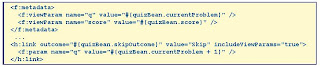
JSF 2.x supports GET requests
New tags h:button, h:link
View Parameters
.Bound to beans when request comes in
.Can be attached to next request
Composite ComponentsMade up of simpler components
Example: Login component with username/password fields
True JSF components
Can attach validators, listeners
Specified with XHTML+composite tags

Ajax

Minor Features
Resource loading
Standard resources directory
h:graphicImage, h:outputStylesheet, h:outputScript have library, name attributes
<h:outputStylesheet library="css" name="styles.css" />
Dynamic versioning
Botched attempt at i18n
New scopes
View scope
Flash
14 new events
Most useful for app developers: preRenderView, postValidate
<f:event type="postValidate" listener="#{user.validate}"/>
How to PlayRI is feature-complete but not bug-free
Download JSF 2.0 RI from http://javaserverfaces.dev.java.net/
Works with Tomcat
Or download Glassfish v3 Prelude
Or Netbeans 6.7 RC
Caveat: These may not have the latest JSF 2.0 implementations today
Looking ForwardComponent libraries for 2.0
IceFaces
RichFaces
Trinidad
Cruft removal
Integration with Web Beans (JSR 299)
The follow link gives out a lot of info. Andy Schwartz has created a fantastic introduction to the new features of JavaServer Faces 2.
http://andyschwartz.wordpress.com/2009/07/31/whats-new-in-jsf-2/
The follow is a slide of introduction of JSF.
http://horstmann.com/presentations/javaone-2009-sl/what-is-new-in-jsf2.html#(1)
JSF 1.x Part of Java EE Standard (JSR 127, 252)
Component oriented web framework
Two implementations: Sun, Apache
Veeeery extensible
Tool support
Third party component libraries
JSF 2.0Part of Java EE 6 (JSR 314)
Reduced XML configuration
Better error handling
Ajax
Support for GET requests
Easier component authoring
Resource handling
Lots of plumbing for tool builders
Easy NavigationBefore:

Managed Bean Annotations

FaceletsWas third party extension (Jacob Hookom)
Now part of the standard
The preferred view handler in JSF
No more JSP mess
MUCH better error messages
Page composition
Bookmarkable URLsIn JSF 1.x, everything is a POST
Browser bar URL one step behind
Can't be bookmarked
JSF 2.x supports GET requests
New tags h:button, h:link
View Parameters
.Bound to beans when request comes in
.Can be attached to next request

Composite ComponentsMade up of simpler components
Example: Login component with username/password fields
True JSF components
Can attach validators, listeners
Specified with XHTML+composite tags

Ajax

Minor Features
Resource loading
Standard resources directory
h:graphicImage, h:outputStylesheet, h:outputScript have library, name attributes
<h:outputStylesheet library="css" name="styles.css" />
Dynamic versioning
Botched attempt at i18n
New scopes
View scope
Flash
14 new events
Most useful for app developers: preRenderView, postValidate
<f:event type="postValidate" listener="#{user.validate}"/>
How to PlayRI is feature-complete but not bug-free
Download JSF 2.0 RI from http://javaserverfaces.dev.java.net/
Works with Tomcat
Or download Glassfish v3 Prelude
Or Netbeans 6.7 RC
Caveat: These may not have the latest JSF 2.0 implementations today
Looking ForwardComponent libraries for 2.0
IceFaces
RichFaces
Trinidad
Cruft removal
Integration with Web Beans (JSR 299)
RichFaces - another wheel from JBoss.
RichFaces 3.3.2 GA finally available for donwloads! Numerous bug fixes, optimizations and community RFCs are ready for the review and usage!
RichFaces is a component library for JSF and an advanced framework for easily integrating AJAX capabilities into business applications.
100+ AJAX enabled components in two libraries
a4j: page centric AJAX controls
rich: self contained, ready to use components
Whole set of JSF benefits while working with AJAX
Skinnability mechanism
Component Development Kit (CDK)
Dynamic resources handling
Testing facilities for components, actions, listeners, and pages
Broad cross-browser support
Large and active community
JSF 2 and RichFaces 4
We are working hard on RichFaces 4.0 which will have full JSF 2 integration. That is not all though, here is a summary of updates and features:
Redesigned modular repository and build system.
Simplified Component Development Kit with annotations, faces-config extensions, advanced templates support and more..
Ajax framework improvements extending the JSF 2 specification.
Component review for consistency, usability, and redesign following semantic HTML principles where possible.
Both server-side and client-side performance optimization.
Strict code clean-up and review.
RichFaces is a component library for JSF and an advanced framework for easily integrating AJAX capabilities into business applications.
100+ AJAX enabled components in two libraries
a4j: page centric AJAX controls
rich: self contained, ready to use components
Whole set of JSF benefits while working with AJAX
Skinnability mechanism
Component Development Kit (CDK)
Dynamic resources handling
Testing facilities for components, actions, listeners, and pages
Broad cross-browser support
Large and active community
JSF 2 and RichFaces 4
We are working hard on RichFaces 4.0 which will have full JSF 2 integration. That is not all though, here is a summary of updates and features:
Redesigned modular repository and build system.
Simplified Component Development Kit with annotations, faces-config extensions, advanced templates support and more..
Ajax framework improvements extending the JSF 2 specification.
Component review for consistency, usability, and redesign following semantic HTML principles where possible.
Both server-side and client-side performance optimization.
Strict code clean-up and review.
ICEfaces - the best JSF framework
ICEfaces has been supported by NetBeans IDE. It looks pretty good and ease the developer to develop web application visually.
ICEfaces 1.8.2 Released
ICEfaces 1.8.2 is an official release that includes over 160 fixes and improvements.
Notable changes include:
• All-new support for "cookieless" mode operation for synchronous ICEfaces applications (deployed to browsers with cookies disabled).
• Enhanced keyboard navigation for the menuBar, menuPopup, panelCollapsible, panelTabSet, and tree components.
• The panelTab component now supports an optional label facet for defining arbitrarily complex labels.
• Enhanced dataExporter: define which columns & rows to export, seamless operation with dataPaginator, portlet support, and improved robustness.
• Improved panelTooltip: smarter positioning, mouse tracking, and customizable display event triggers (hover, click, etc.).
• Support for nested modal panelPopups.
• The inputFile component now supports optional "autoUpload" mode.
• The graphicImage component now supports all ICEfaces Resource APIs for specifying image resources.
• The outputResource component now has improved special character support for resource file-names.
• Rendering performance optimizations have been made to the dataTable, panelGroup, panelSeries, and menuBar components.
• Updated Component Showcase sample application illustrating new component capabilities.
ICEfaces 1.8.2 Released
ICEfaces 1.8.2 is an official release that includes over 160 fixes and improvements.
Notable changes include:
• All-new support for "cookieless" mode operation for synchronous ICEfaces applications (deployed to browsers with cookies disabled).
• Enhanced keyboard navigation for the menuBar, menuPopup, panelCollapsible, panelTabSet, and tree components.
• The panelTab component now supports an optional label facet for defining arbitrarily complex labels.
• Enhanced dataExporter: define which columns & rows to export, seamless operation with dataPaginator, portlet support, and improved robustness.
• Improved panelTooltip: smarter positioning, mouse tracking, and customizable display event triggers (hover, click, etc.).
• Support for nested modal panelPopups.
• The inputFile component now supports optional "autoUpload" mode.
• The graphicImage component now supports all ICEfaces Resource APIs for specifying image resources.
• The outputResource component now has improved special character support for resource file-names.
• Rendering performance optimizations have been made to the dataTable, panelGroup, panelSeries, and menuBar components.
• Updated Component Showcase sample application illustrating new component capabilities.
Monday, September 21, 2009
PrimeFaces UI 0.9.3 is released/IPhone App Development with JSF
(From http://www.theserverside.com/news/thread.tss?thread_id=58131)
UI Components 0.9.3 features the TouchFaces mobile UI kit, 5 new components, improved portlet support, enhanced datatable and various improvements.
* TouchFaces - UI Development kit for mobile devices mainly iphone
* New component : FileUpload (Reimplemented)
* New component : Tooltip (Reimplemented)
* New component : PickList
* New component : HotKey
* New component : Virtual Keyboard
* Easy row selection, ajax pagination, data filtering and lazy loading enhancements to DataTable
* Significantly improved portal support for JSR168 and JSR268 portlets.
* Pojo and Converter support for AutoComplete
(From http://www.theserverside.com/news/thread.tss?thread_id=57877)
TouchFaces is a new subproject of PrimeFaces targeting the mobile
devices mainly iphone. Applications created with TouchFaces have the native look and feel of an IPhone applications and still benefit from the Java/JSF infrastructure. In addition TouchFaces depends on the PrimeFaces UI so ajax is built-in.
There's a 10 minute getting started screencast available online.
Website: http://primefaces.prime.com.tr/en/
UI Components 0.9.3 features the TouchFaces mobile UI kit, 5 new components, improved portlet support, enhanced datatable and various improvements.
* TouchFaces - UI Development kit for mobile devices mainly iphone
* New component : FileUpload (Reimplemented)
* New component : Tooltip (Reimplemented)
* New component : PickList
* New component : HotKey
* New component : Virtual Keyboard
* Easy row selection, ajax pagination, data filtering and lazy loading enhancements to DataTable
* Significantly improved portal support for JSR168 and JSR268 portlets.
* Pojo and Converter support for AutoComplete
(From http://www.theserverside.com/news/thread.tss?thread_id=57877)
TouchFaces is a new subproject of PrimeFaces targeting the mobile
devices mainly iphone. Applications created with TouchFaces have the native look and feel of an IPhone applications and still benefit from the Java/JSF infrastructure. In addition TouchFaces depends on the PrimeFaces UI so ajax is built-in.
There's a 10 minute getting started screencast available online.
Website: http://primefaces.prime.com.tr/en/
User specified error message
Error messages starting from -20000 until -20999 are user specified error messages.
Oracle provides these range of codes so applications can raise an application specific error, which will be displayed after the chosen code.
This is done using the raise_application_error pl/sql function.
You'll have to contact the application provider should you want to have more detail about the error message.
Unless the error message is of an Oracle application or functionality, it is useless to contact Oracle for these errors.
Imagine I have a procedure which takes an argument. This arguments needs to be between 0 and 100:
The same thing happened with you, if you receive this error with one of our applications, you need to contact us in order to solve this problem.
So the only one who can help is the application vendor or service provider.
Oracle provides these range of codes so applications can raise an application specific error, which will be displayed after the chosen code.
This is done using the raise_application_error pl/sql function.
You'll have to contact the application provider should you want to have more detail about the error message.
Unless the error message is of an Oracle application or functionality, it is useless to contact Oracle for these errors.
Imagine I have a procedure which takes an argument. This arguments needs to be between 0 and 100:
create or replace procedure add_salary(pRaise number) is begin if pRaise not between 0 and 100 then raise_application_error(-20000, 'Raise need to be between 0 and 100'); end if; -- do further processing end; / Procedure created. SQL>Now we test the procedure with a valid argument:
SQL> exec add_salary(0); PL/SQL procedure successfully completed.And now with an invalid argument:
SQL> exec add_salary(110); BEGIN add_salary(110); END; * ERROR at line 1: ORA-20000: Raise need to be between 0 and 100 ORA-06512: at "DEV01.ADD_SALARY", line 4 ORA-06512: at line 1As one can see, we raised a custom error -20000 with a user defined error message.
The same thing happened with you, if you receive this error with one of our applications, you need to contact us in order to solve this problem.
So the only one who can help is the application vendor or service provider.
Handle Oracle PL/SQL Exception.
Few use the Oracle stored procedure in Java application. Today, I have to learn it as there is a modification in stored procedure. By the searching, got a link from Oracle website. It is a official help and pretty good. But I really hate to use them in application if not very very necessary. Anyway, just put here for a reference.
http://download.oracle.com/docs/cd/B19306_01/appdev.102/b14261/errors.htm#i1863
http://download.oracle.com/docs/cd/B19306_01/appdev.102/b14261/errors.htm#i1863
Thursday, July 23, 2009
GMaps4JSF 1.1.2 release
GMaps4JSF 1.1.2 release: "GMaps4JSF 1.1.2 release"
JSF is really a good framework and this feature is truely help us.
JSF is really a good framework and this feature is truely help us.
Monday, July 06, 2009
Ubuntu下如何安装Cisco VPN client - Rainman的专栏 - CSDN博客
This is a installation guide for VPN on Ubuntu.
Ubuntu下如何安装Cisco VPN client - Rainman的专栏 - CSDN博客: "Ubuntu下如何安装Cisco VPN client"
我的环境是Ubuntu 8.04, VPN Client的版本是vpnclient-linux-x86_64-4.8.01.0640-k9。
1. 下载Cisco VPN client 的压缩包vpnclient-linux-x86_64-4.8.01.0640-k9.tar.gz, 可以直接在google输入这个文件名下载。
2. 下载以后打开命令窗口执行 tar zxvf vpnclient-linux-x86_64-4.8.01.0640-k9.tar.gz解压,目录下会出现vpnclient的文件夹。
3. 下载vpnclient的patch文件, 对应这个版本的patch是vpnclient-linux-2.6.24.diff,用其他的版本应该不会成功。这个文件也可以直接在google输入文件名下载。
4. 把下载下来的vpnclient-linux-2.6.24.diff放到刚才解压的vpnclient文件夹内。
5. 把目录切换到vpnclient文件夹下。
6. 执行$ patch < vpnclient-linux-2.6.24-final.diff
7. 执行$ sudo ./vpn_install 根据提示选择安装的路径或者直接按回车按照默认路径安装
8. 执行 sudo /etc/init.d/vpnclient_init start 输入密码,如果提示Starting /opt/cisco-vpnclient/bin/vpnclient: Done就表示安装成功了。
9. 把你的pcf文件放到etc/opt/cisco-vpnclient/Profiles/ 文件夹下,比如是mypcf.pcf。
10. 执行$vpnclient connect mypcf按照提示输入你的用户名密码等等就可以开始vpn之旅了。
本文来自CSDN博客,转载请标明出处:http://blog.csdn.net/jinhuiyu/archive/2009/01/18/3821246.aspx
Ubuntu下如何安装Cisco VPN client - Rainman的专栏 - CSDN博客: "Ubuntu下如何安装Cisco VPN client"
我的环境是Ubuntu 8.04, VPN Client的版本是vpnclient-linux-x86_64-4.8.01.0640-k9。
1. 下载Cisco VPN client 的压缩包vpnclient-linux-x86_64-4.8.01.0640-k9.tar.gz, 可以直接在google输入这个文件名下载。
2. 下载以后打开命令窗口执行 tar zxvf vpnclient-linux-x86_64-4.8.01.0640-k9.tar.gz解压,目录下会出现vpnclient的文件夹。
3. 下载vpnclient的patch文件, 对应这个版本的patch是vpnclient-linux-2.6.24.diff,用其他的版本应该不会成功。这个文件也可以直接在google输入文件名下载。
4. 把下载下来的vpnclient-linux-2.6.24.diff放到刚才解压的vpnclient文件夹内。
5. 把目录切换到vpnclient文件夹下。
6. 执行$ patch < vpnclient-linux-2.6.24-final.diff
7. 执行$ sudo ./vpn_install 根据提示选择安装的路径或者直接按回车按照默认路径安装
8. 执行 sudo /etc/init.d/vpnclient_init start 输入密码,如果提示Starting /opt/cisco-vpnclient/bin/vpnclient: Done就表示安装成功了。
9. 把你的pcf文件放到etc/opt/cisco-vpnclient/Profiles/ 文件夹下,比如是mypcf.pcf。
10. 执行$vpnclient connect mypcf按照提示输入你的用户名密码等等就可以开始vpn之旅了。
本文来自CSDN博客,转载请标明出处:http://blog.csdn.net/jinhuiyu/archive/2009/01/18/3821246.aspx
Wednesday, May 20, 2009
Thursday, April 02, 2009
OSGi and Spring: Part 2: Build and deploy OSGi as Spring bundles using Felix
OSGi and Spring: Part 2: Build and deploy OSGi as Spring bundles using Felix: "OSGi and Spring: Part 2: Build and deploy OSGi as Spring bundles using Felix"
OSGi and Spring, Part 1: Build and deploy OSGi bundles using Apache Felix
OSGi and Spring, Part 1: Build and deploy OSGi bundles using Apache Felix: "OSGi and Spring, Part 1: Build and deploy OSGi bundles using Apache Felix"
Subscribe to:
Posts (Atom)